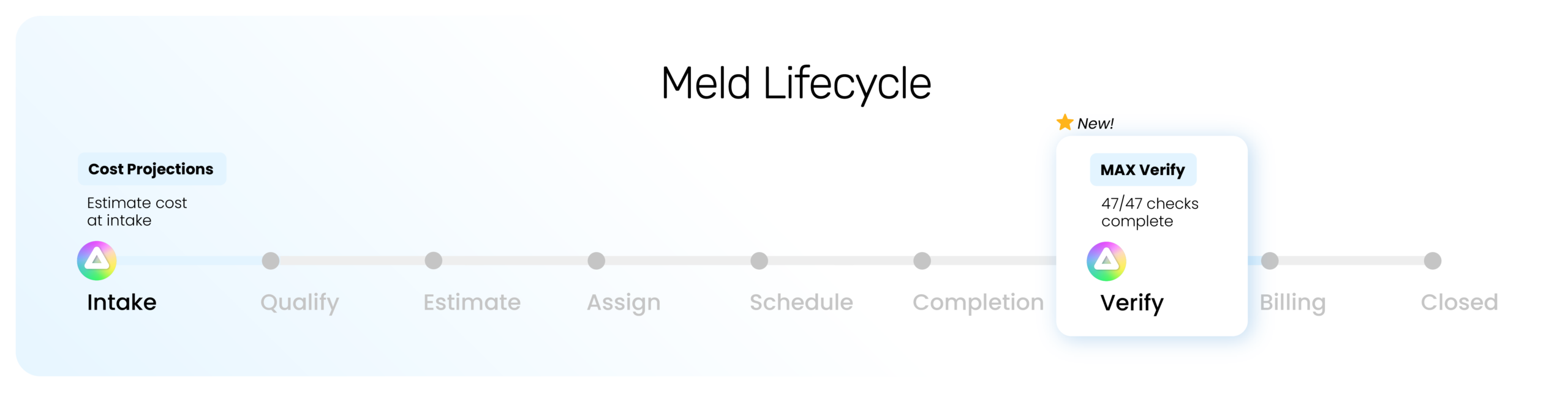











When you know what maintenance really costs, you can catch what gets missed, protect your maintenance dollars, and make smarter decisions about what happens next.
Whether you’re preparing your account or exploring new TrueCost capabilities, discover how to get a clearer picture of maintenance costs and make every dollar count.
TrueCost brings cost intelligence throughout the maintenance lifecycle, helping your team make smarter financial decisions and get closer to the true cost of every repair.
And now, Completion is no longer the finish line. Review & Verify creates a checkpoint before Billing, when applicable, and Closed, helping ensure the financial details are accounted for before the job is truly finished.
Want the full picture? Learn how TrueCost works across the maintenance lifecycle, including cost capture, verification, billing, and Insights.
The right settings make everything that follows easier. Establish consistent cost calculations and close-out rules now, so your team can spend less time on manual work and more time making informed decisions.
Set your rates once so labor and markup are calculated consistently, reducing manual calculations and helping you account for the full cost of maintenance.
Not every repair needs a bill. Set rules that automatically close eligible Melds after verification, taking another manual step off your team’s plate.
Make sure every bill reflects the right company identity, giving Coordinators a consistent way to prepare bills for the properties they manage.
Keep financial information moving from Property Meld to AppFolio with consistent GL code mapping, reducing manual entry and making it easier to identify sync issues.
See what happens when bills reach AppFolio, so your accounting team knows what to expect and where to find the financial information.
The invoice doesn’t always tell the whole story. Labor, parts, and other expenses all contribute to the true cost of maintenance. Capturing those details as work happens gives your team a more complete financial picture and fewer costs to track down later.
Make sure the materials, supplies, and other expenses behind a repair are accounted for, not left out of the total cost.
Technician time is part of what maintenance costs. Capture it as work happens so labor is reflected in the financial record without having to piece it together later.
Capture expenses and receipts right from the field, while the details are fresh, so your team has less to track down after the repair.
A completed repair doesn’t always mean every detail is accounted for. Review & Verify gives your team a dedicated checkpoint to catch missing information and confirm the work before moving forward. With Ops, MAX™ Verify adds a second set of eyes to help surface what deserves attention.
Give completed work a final review so you can confidently confirm the repair and its financial details before moving forward.
Instead of manually cross-checking every detail, start with what MAX has already surfaced across 47 checks. See what needs attention, make corrections where needed, and keep the final decision with your team.
Finishing the repair is only part of the job. TrueCost gives every verified Meld a clear path to Closed, whether that means billing for the work or confirming no bill is needed. That means more accountability for the dollars behind every repair.
Understand the two paths to Closed so your team knows when to create a bill and when to close without one.
Not every Meld needs to be billed. Confirm that no bill is needed, document the reason, and move the Meld to Closed.
Turn verified costs into a bill directly in Property Meld, helping your team account for billable expenses and prepare accurate bills for AppFolio.
Better cost information creates opportunities to make better decisions. TrueCost Insights Pro brings your maintenance data together so you can identify spending patterns, spot potential inefficiencies, and see where your team can improve performance.
Go beyond individual repairs to understand spending, verification progress, and financial performance across your operation, including margins and cost recovery where applicable.
Understanding TrueCost Insights Pro
How TrueCost Insights Pro Charts Work