

Resident Sign-Off
Now you have the option to allow or require your technicians to collect resident signatures after work has been completed. This is a huge win for legal protection! Enable resident sign-off here. By default, resident sign-off is disabled. This feature is only available in the technician mobile app, found in the App Store or Google Play.


Coming Soon to the Technician Mobile App
• Technician Scheduling: Techs will have the ability to schedule
• New capabilities with MAX will allow for a deeper look into costs and forecasting
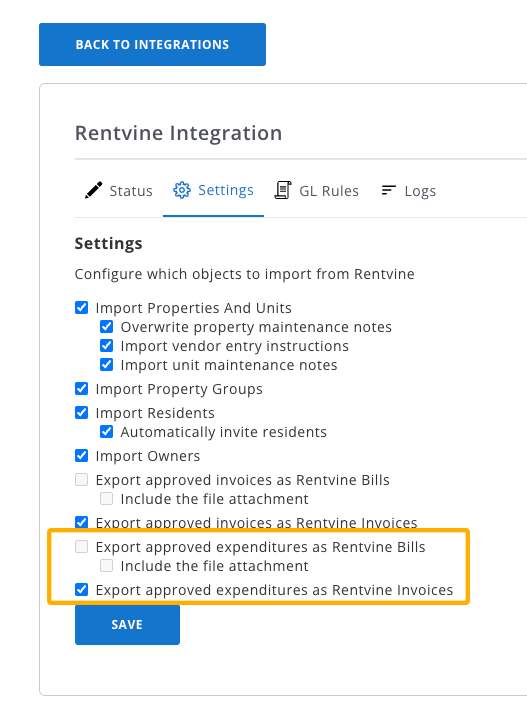
[Rentvine-Integrated Users] Send Invoices/Expenditures as “Invoices”, not “Bills”
To improve clarity between systems, we have given the option to send invoices/expenditures to Rentvine as “Invoices”, instead of “Bills”.

MAX On-Call Updates
Submit Multiple Melds
Residents can submit multiple Melds in one call. MAX will then create separate Melds for each issue.
Check Meld Status
MAX On-Call is no longer just for intake. Residents can now do the following:
• Inquire on the status of any Melds in-progress
• Request escalation of their previously-created Meld
• Update availability or request to reschedule maintenance
• Request to cancel a Meld
Message Management Team
MAX can forward Meld messages on to the management team (Example: Resident: “Could you let managent know the hinges are the type that are not visible when the cabinet door is shut?”)
Enroll in SMS Follow-ups
Now, when a resident is not yet enrolled in SMS notfications, MAX will ask before submitting a Meld or sending a message to the management team.